

Article en Français
Supernova Follow-Up Program
This program follows several seasons spent volunteering at the Bishop's University Observatory.
With Dr. Lorne Nelson, the department and observatory director, who taught me a great deal, we worked hard to develop the telescope to perform well in various types of research, particularly in spectroscopy.
Among the follow-up projects to be developed, the supernovae project was studied... Around the same time, my friend Claude Duplessis proposed creating a similar program to encourage amateur astronomers.
Since I liked the idea, I took it up and simply adopted and continued it at the Bishop's University Observatory.
At the 2017 FAAQ Congress, I explained my method in a short presentation.
I often use the C2A software, which I really like, but the steps can be followed with any other software.
The principle is simple:
- Create a monthly list of galaxies suited to my equipment and standardize my imaging method to obtain consistently comparable images.
- Set up a computer database to store sample images of my galaxies.
- Re-examine galaxies as often as possible and compare them (blink) with previous images to detect changes.
* Register (if possible in advance) on the "IAU Supernova Working Group" website: https://wis-tns.weizmann.ac.il to create an account before starting. This account will also allow you to receive updates on the latest discoveries.
Here are the steps:
Planning using C2A software
From C2A, in "tools", then "options" and finally "Date", I modify the time and date of the software to have the 15th of the desired month, at 23:00.
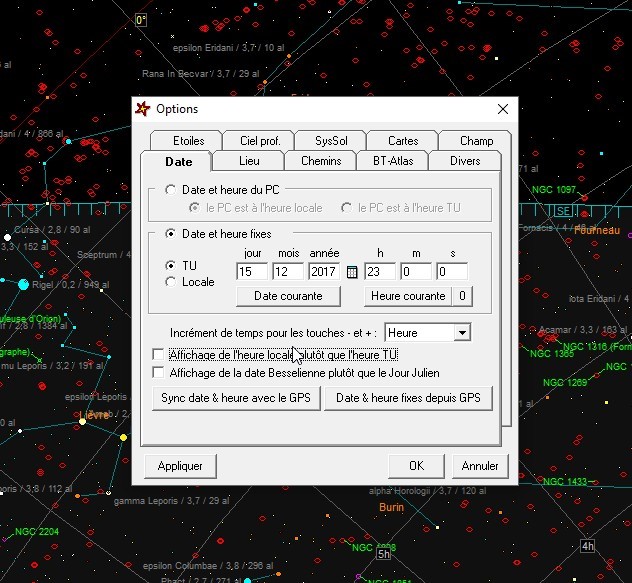
Next, in the observation planning module, I select "Telescope" and "Observation Planning":
- In the top left (Object Selection), I select galaxies.
- In the top right (Search Area), I select "Search across the entire sky."
- Maximum magnitude of 16.
- In the position criteria, under "Above Horizon," I choose 40 degrees.
- Finally, I check "Object without magnitude," and then "Take into account."
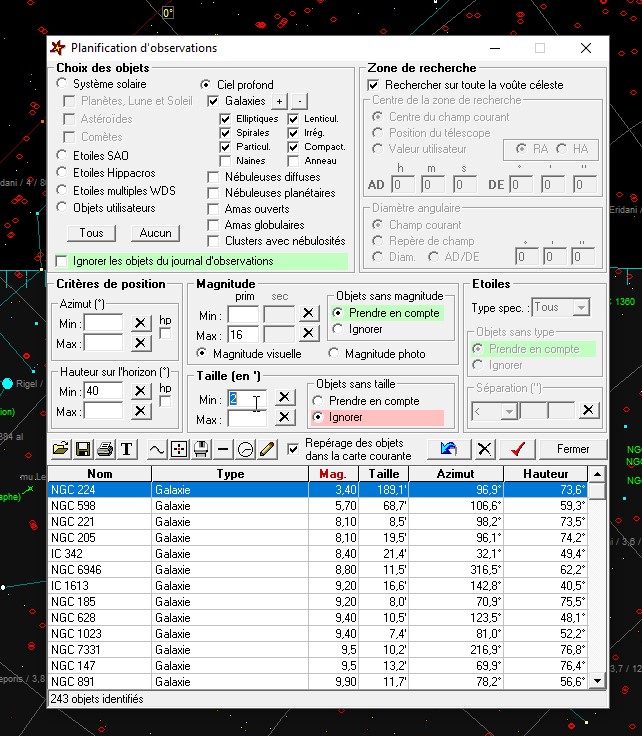
After that, it depends on individual criteria, as the final criterion will be the size of the object.
Depending on your telescope, your camera… In short, if you select a size of 4' and click the red checkmark, you'll get a selection of 44 objects based on the criteria already mentioned and your location. At 2', this increases to 243 objects.
For my program, I chose 3' to get 86 objects, then I selected the best ones, because, after all, it has to be enjoyable. A selection of approximately 20 or fewer objects is generated for Quebec. Even more if you add other programs to your schedule during the same month. Only in April did I select a size of 4', because 3' gave me a selection of 340 objects, while the observing program is limited to about 300.
For the final selection, it is easier to work in the "observation program" module. For the transfer, simply select everything (CTRL-A) and click on the transfer button, the one with a small clock.
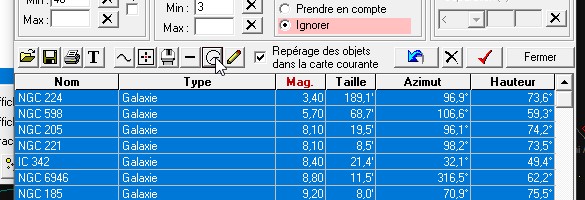
To open the program, go to the "Observation Program Telescope" menu.
This is where you can work on your program by sorting the desired galaxies and then saving your monthly program somewhere safe and easily accessible.
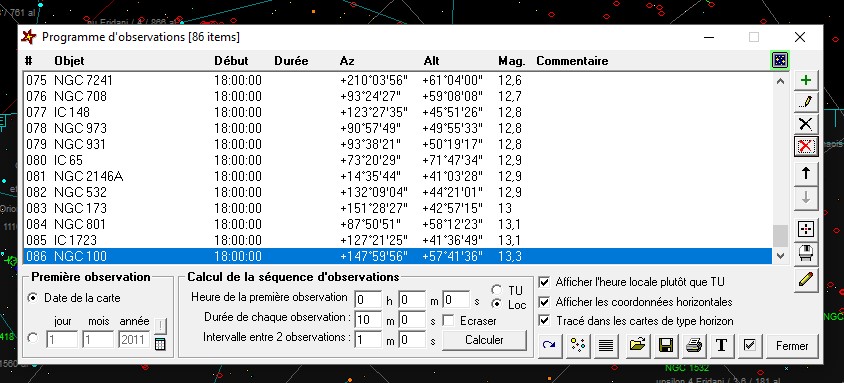
For the other months, the technique is the same: we only change the month.
Image capture, processing and classification
At the OMSJ observatory, I use two telescopes mounted on an EQ-6 mount: a C9.25 and a 600mm Orion ED-80 refractor.
For standard imaging during this tracking operation, the C9.25 is equipped with a Moonlite focuser, a filter wheel with five apertures including narrowband filters, and a V-filter for photometry. Finally, an STF-8300M camera is used for imaging.
The setup provides a resolution of 25.9 x 19.6 arcseconds at an angle of view of 0.271 degrees and a resolution of 0.465 arcseconds per pixel.
A raw image (FIT) of the object is captured and is readily available. For the first image, you can then use MaximDL's "Process -> Animate" and "View -> Animate" with the previously captured image to check for any changes.
The secret is consistency...
For the final processing and sorting...
The processing consists of basic calibration with Dark and Bias frames, which are taken in advance before each new season. Flat images, however, are taken at the end of each session using a calibrated LED panel.
The images are visually checked, then calibrated and stacked simultaneously in MaximDL.
As a next step, the resulting image undergoes stretching, then a "Digital Development" filter, and finally, for aesthetic purposes, a "Wavelet Filter."
Subsequently, the images will be classified on a large capacity hard drive, first in a directory named after the object, then by the date of shooting, while leaving a lightweight JPG at the root of the directory to facilitate searches and future comparisons.
In the case of a find!
1- FIRST, CALM DOWN!!! ;0)
2- If possible, first check with a good friend you've known for a long time.
Double-check again with other images from the internet or another source.
Otherwise, ask other trusted people to confirm.
4- If you're sure, then submit a report at this link: https://wis-tns.weizmann.ac.il/reports
by logging in with your previously created account.
So good luck!
*Claude Duplessis in 2018: "Currently, no Quebecer has yet discovered a supernova!"
Well, that's changed!
Thanks to a collaboration with the GSNST research group, SN2021elc has been found:
https://www.wis-tns.org/object/2021elc?fbclid=IwAR28hjfe42e56yFgD9v69pjtXAXhaXXKNNN9smJovl54e0vUvwTN30ers5k